 Using Task Dependencies
You can make a task dependent on a previously numbered task that is within the same Smartflow master project. Task dependencies A term to describe and list tasks that need to be completed in the current project level (skipped/cancelled/skip/complete/approved/rejected) before this specific task can become active. can be on the same project level or within a parent and child project (for example, the master project and level 1 sub project, or a level 1 sub project and level 2 sub project). This offers you more flexibility in the workflow processes that can be configured in Smartflow, allowing you to more accurately reflect your processes and increase automation.
You can design task dependencies to be dynamic. For example, a sub project added during the lifetime of a project can include tasks (scheduled) that automatically depend on tasks in the master project without needing to edit these tasks to add this dependency. Similarly, tasks (scheduled) in master project can automatically (via dynamic dependency) become dependent on tasks in newly added sub projects. This is achieved by creation of Activation Flags A flag placed on a task which indicates that the completion (complete, user skip, cancel, approve, reject) of this task can be used to activate tasks in other levels. which are assigned to tasks. Tasks in other levels can then be set to be dependent on those tasks with a specific activation flag.
In task Dependency, you can add an additional activation dependency An additional dependency placed on a task that links the activation of this task to tasks in other levels via Activation Flags.
All tasks have Task Dependency to other tasks in the same project level, whereas only a selection of tasks will have additional Activation Dependency on tasks in other project levels (one level up or one level below). A task will become active once both Task Dependency and Activation Dependency requirements have been met. via the Tasks in Other Levels option to select tasks in the master or sub project. The list of Activation Flags for this task to depend on is displayed, in addition to the normal preceding task dependencies. For more information, see Add a Task Dependency.
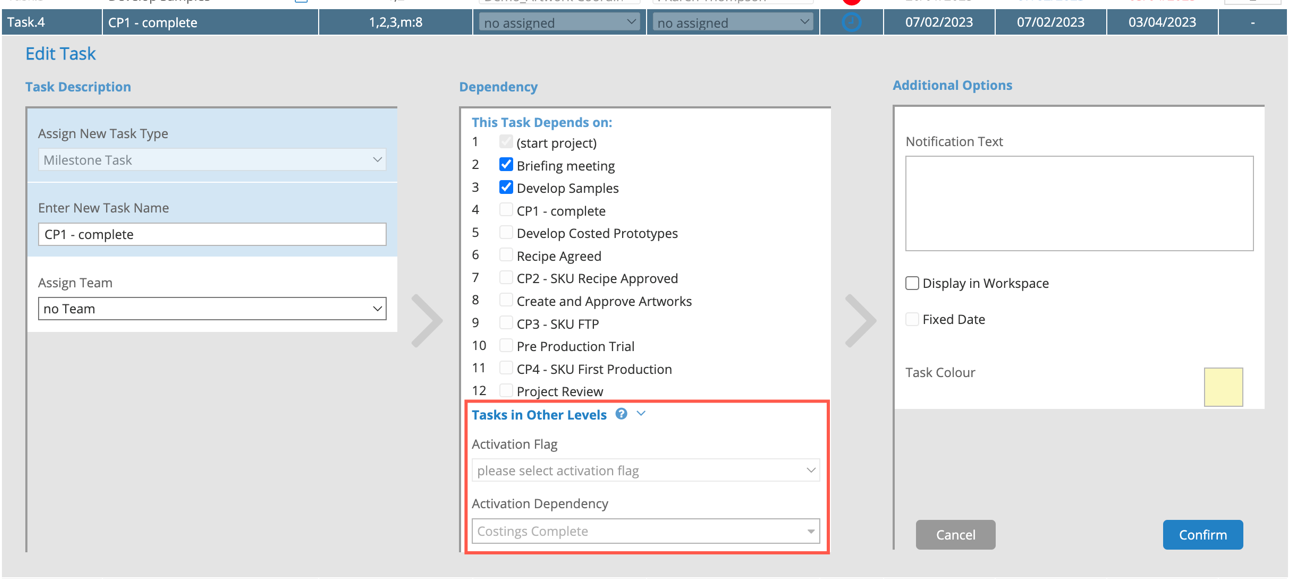
Example: Milestones
You can use milestones in the master level of a project to give visibility of progress across multiple sub projects by having a dependency on tasks within the sub projects, but not necessarily the whole sub project. This allows you to easily see the milestones or "Stage Gates" that the sub projects have collectively met, without needing to open each sub project to collate the progress information into a task at the master level and manually complete it.
Example: Concurrent Workflow Levels
Concurrent workflow levels allow you to begin sub projects earlier in a project timeline while being able to have sub project tasks refer up to tasks in the master level and be dependent on them, effectively allowing a sub project to wait and then carry on. This feature prevents you from having to perform manual checks on master project tasks before progressing sub project tasks, or from having to configure separate sub projects to guarantee an exact process is followed.
Tips:
- Dependency works one level up or one level down only.
- Dependent tasks in a sub project need to be below the activation point in workflow order.
- Activation Flags can be added to the following task types: standard, buffer, milestone, milestone fixed, enter project data, upload project file, sub project, and team notify.
- Activation Dependency can be added to the following task types: sub project, standard, buffer, milestone, enter project data, upload project file, sub project, and team notify.
- Administrators are advised to avoid circular dependency.
- Date calculations based on advanced dependency will be available in a future release of Smartflow.