 Replace the Label Template
You can use a business rule to determine which label template to use when processing a print request. The business rule can create a request for a particular label template based on data in the print request. For example, you can convert a request for a generic shipping label to a region-specific shipping label. This approach is sometimes referred to as label template substitution or label substitution.
Important! Content in a business rule is case sensitive.
Tip: If you always want to use the same label template when a particular simple process is run, you can specify the path to that label template in the Document field for the process. You do not need to use a business rule unless you also want to implement business logic.
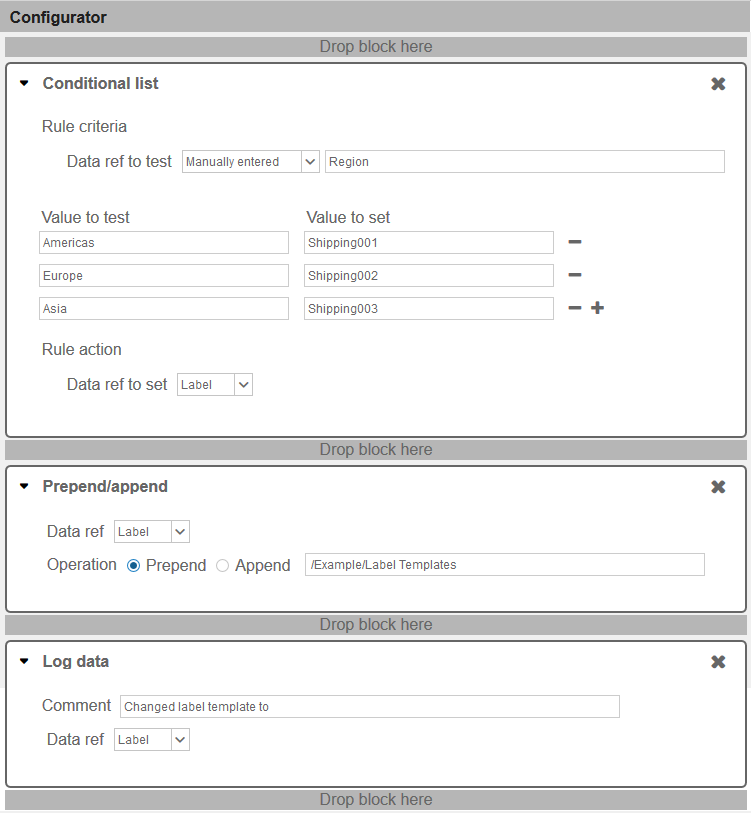
The following is a component set in a business rule that selects the shipping label template based on the region specified for the job. The trigger for this component set is job submission. The label templates are in the /Example/Label Templates/ folder. The label template named Shipping001 is intended for use in the Americas region, Shipping002 is for use in Europe, and Shipping003 is for use in Asia Pacific. The region name must be specified as part of the print request. This business rule can be run by a simple process.
Note: The value for the data ref named Region must be provided either by a JDBC data service that establishes a connection to a database, by an integration, or by another business rule.
 more
more