 BL.INK QR Code Generation in Project Data
Integration with BL.INK’s API suite enables you to generate and manage QR codes directly within Smartflow.
You can request QR codes within Smartflow and incorporate them into the pack copy profile.
Note: You must install your own instance of the BL.INK application.
Smartflow utilizes BL.INK APIs to generate or update QR codes dynamically, aligning with user-defined parameters.
To create, update, or remove your QR codes:
-
Select your Project.
-
Go to the Project Data tab and click the Edit button.
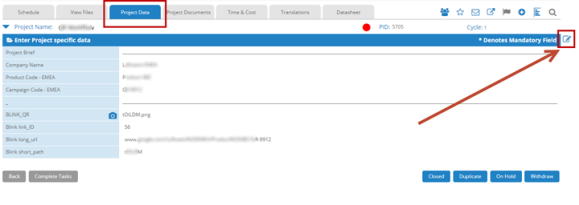
-
You can now create, remove, or update your QR codes.
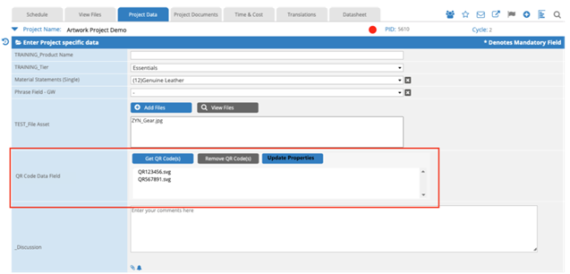
You can generate your QR codes in SVG, PNG, or EPS image format.
A configuration option, QR Code in the Upload File Project Data Field, generates a QR code based on parameters sourced from other data fields.
Upon QR code generation, the resulting file uploads to the Project Documents tab.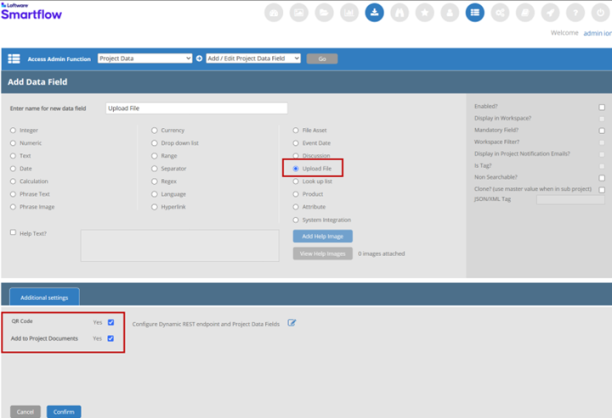
In the field configuration, you specify the BL.INK endpoint (i.e., the BL.INK instance or an authorized system) and select which data fields supply API call parameters. Smartflow uses the selected Project Data Field names as parameter names, conforming to BL.INK API requirements. You can manage the REST Endpoint URL in Admin > System Settings > REST Call ROOT URL Page.
 more
more