 Product Lists Page
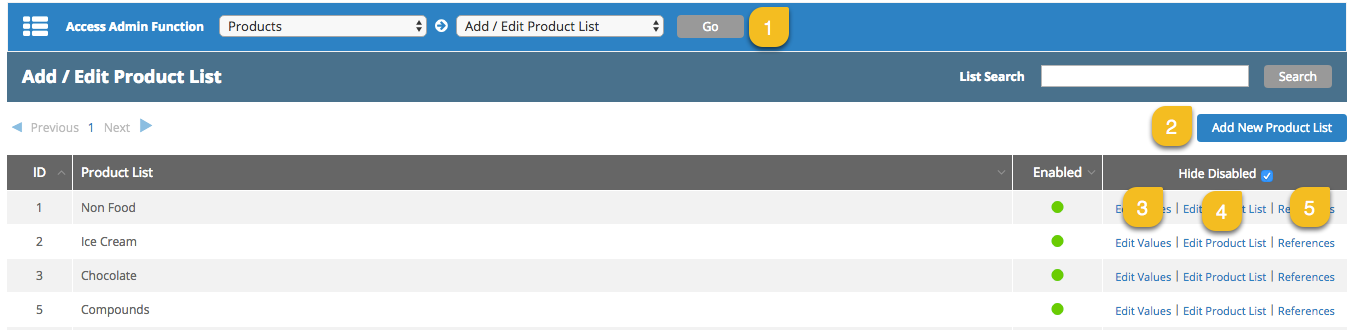
Product Lists can be maintained from the Products > Add/Edit Product List page.
|
|
Description |
|---|---|
|
1 |
To access Product List options, select Products and Add/Edit Product List + Go |
|
2 |
Click to add new Product List. |
|
3 |
Edit Values to display Products within this Product List. |
|
4 |
Click to edit Product List name. |
|
5 |
References – project data fields referencing this Product List. |
Product Page
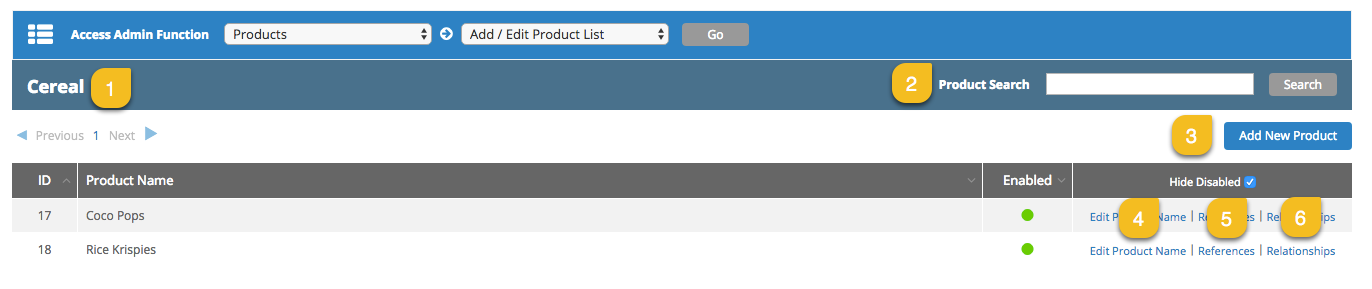
Use link Edit Values to the right of the Product List in the Add/Edit Product List page to display the Products stored in this List.
|
|
Description |
|---|---|
|
1 |
Product List name |
|
2 |
Search for Product |
|
3 |
Click to add new Product |
|
4 |
Edit Product Name and Enable/Disable Product. |
|
5 |
View Product references (project where this product is selected) |
|
6 |
Define Product relationships (to Attribute/s, to Phrase/s) |
 more
more